• Native macOS
  • MP4 & MOV
  • No re-encoding
  • Offline
  • No FFMPEG

Trim videos without re-encoding using AI

Mark segments, detect shots, find faces and objects, then export with stream copying. Your quality stays identical to the source.

Latest macOS DMG from losslessvideocutter.com. Signed by NuFrnd AI Limited and notarized by Apple.

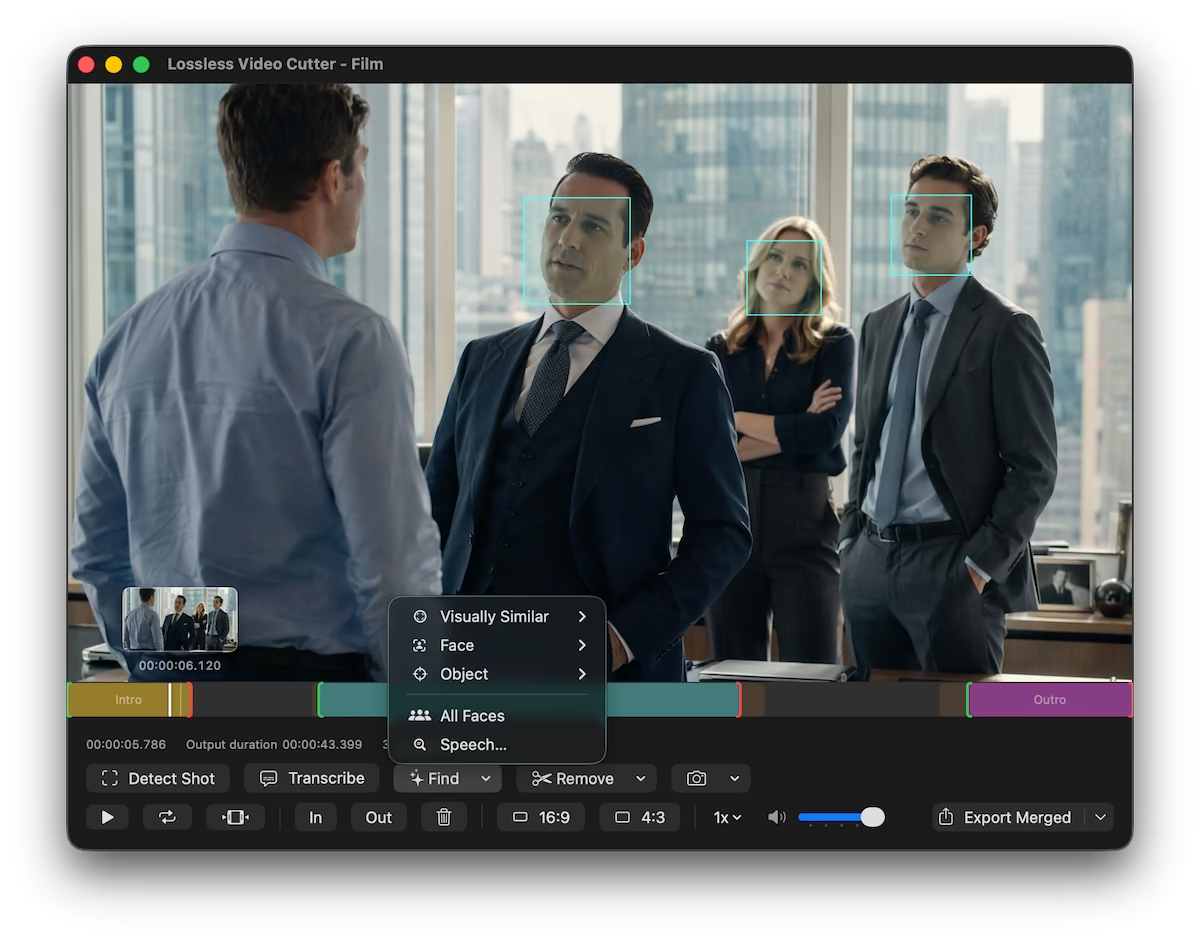
Lossless Video Cutter app window with video preview, timeline, segment controls, facial recognition, object detection, and visual similarity.

Features

Trim & timeline

  • In / Out workflow for marking keep segments
  • Interactive timeline with draggable segment edges
  • Play Segments Only mode skips the removed portions during playback
  • Invert selection to flip kept and removed parts
  • Preview zoom and pan for detail inspection
  • Detect shot at the playhead
  • Detect All Shots across the entire file
  • Configurable shot detection sensitivity
  • Adjustable search window and scan intervals
  • Full keyboard shortcut support

Find & detect

Pro
  • On-device AI, your video never leaves your Mac
  • Find Face from current frame or reference photo
  • Find Object from a frame or reference image
  • Find Visually Similar from a frame or image
  • Find Speech to search by spoken words or phrases
  • Find All Faces, label people, and search again
  • Dedup detected faces with a live preview, or drag faces together to merge
  • Remove silence and rebuild your selection
  • Remove black screens and rebuild your selection
  • Transcribe audio to text on device

Export

  • Lossless export without re-encoding
  • Export one combined file or separate clips per segment
  • Keyframe-aligned cuts for passthrough export
  • MP4, MOV, M4V, MTS, MKV, and more
  • MKV and WebM merged export without FFmpeg
  • Export audio only (M4A passthrough)
  • Create video files from still images and audio
  • Display aspect ratio metadata (16:9 / 4:3)
  • Proxy MP4 export for smaller shareable files
  • Export filename patterns with custom tokens

Workflow

  • Playlist queue with batch export
  • Combined export across multiple playlist videos
  • Batch Find and export from the playlist
  • Add, remove, replace, and mix audio tracks
  • Save and open project files (.lvc packages)
  • Session recovery restores unsaved work per video
  • Save or copy the current frame as an image
  • Export contact sheet with timecoded thumbnails
  • Export face sheet from detected faces
  • File Info, Segments, Faces, and Logs windows

Compare plans

Free

Core editing
$0 forever
  • Set and edit segments on the timeline
  • Export losslessly as one combined file or separate clips
  • Detect shot boundaries at the playhead
  • Build a playlist and combine items into one export
  • Adjust video aspect ratio, and keyframe-aligned cuts

Pro · Monthly

$9 per month
  • Select video segments by facial or object recognition
  • Find visually similar shots from a frame or image
  • Remove black screens and remove silence
  • Find by spoken words (speech search)
  • Add, remove, or replace audio tracks

Pro · Yearly

Best value
$49 per year
  • Select video segments by facial or object recognition
  • Find visually similar shots from a frame or image
  • Remove black screens and remove silence
  • Find by spoken words (speech search)
  • Add, remove, or replace audio tracks
  • Free download
  • 7-day trial
  • 1 active Mac

Download for free. upgrade for advanced features

The app is free to install. When you want Find Face, Find Object, and other premium tools, start a trial or choose a plan. Use the Access Purchase link in your email to open your customer portal, then copy your license key and paste it into the app.

Direct download from losslessvideocutter.com. Latest macOS DMG.

FAQ

Frequently asked questions

Quick answers about lossless cutting, quality, and how the app handles your files.

Why aren't my exported segments perfectly frame-accurate?

Lossless export copies compressed video without re-encoding.

In formats like MP4, only some frames are full keyframes, so cuts must land on valid points in the file.

Picture quality stays the same as the source, but start and end times may snap to the nearest valid spot, not every single frame.

Getting exact frames usually means re-encoding, which this app avoids on purpose.

Is the Mac download signed and notarized?

Yes. The DMG is signed by NuFrnd AI Limited with an Apple Developer ID certificate.

The app and DMG are notarized by Apple before release, then distributed directly from losslessvideocutter.com.

What does “lossless” mean in this app?

Video and audio are exported with stream copying where possible, so picture and sound are not recompressed.

You keep the same quality and avoid generation loss.

The tradeoff is the keyframe alignment limits described above.

Do my videos get uploaded to the cloud?

No. Editing, previews, and exports run on your Mac.

Face recognition and object detection use on-device AI models, so those scans stay offline too.

Your source files stay local unless you choose to share them yourself.

Which formats does Lossless Video Cutter support?

The app targets common formats you can open on a Mac, especially MP4 and MOV.

Whether a specific file works depends on what your system can play; unusual formats or copy-protected movies may not open or export losslessly.

Do I need FFmpeg installed?

No. Playback and export use the media support built into macOS.

You don't need to install or maintain FFmpeg separately.

Why doesn't the app use FFmpeg?

Lossless Video Cutter uses the same video engine your Mac already uses for QuickTime and Finder previews. That gives you a few things you notice right away:

Videos open instantly. There is no loading bar or progress spinner before you can start editing, even on long files. Timeline thumbnails fill in quietly in the background while you work.

Nothing to install or set up. You don't need Homebrew, the Terminal, or a separate FFmpeg download. Just open the app and drop a video in.

The preview matches the export. Where you set your cut in the timeline is where the cut actually lands, because preview and export use the same playback engine.

How do the free app, trial, and Pro features work?

You can download and use the core editor for free.

Pro features (like face- and object-based segment discovery and other premium tools) unlock after you start a trial or subscribe.

After checkout, use the Access Purchase button in your email to open the customer portal.

In the customer portal, copy your license key, then open the app’s Settings and paste it to activate this Mac.

How do I activate my license?

After subscribing or starting a trial, check your inbox for the confirmation email and click the Access Purchase button.

That opens your customer portal where your license key is displayed. Copy it.

In the app, open Settings (⌘,), paste the key into the License Key field, and click Activate. Pro features unlock immediately on that Mac.

Can I get a refund?

You may request a refund within 24 hours of an initial purchase charge or a subscription renewal.

Use the refund request form so we can match your account and process eligible requests quickly.

Open refund request form

Why is this macOS-only?

It's a native Mac app focused on reliable lossless export.

There isn't a Windows or Linux build today.

How do I uninstall Lossless Video Cutter?

Quit the app, then drag Lossless Video Cutter from your Applications folder to the Trash.

To remove temporary working data too, open Settings in the app before uninstalling and use Delete Temporary Files.

How do I send feedback or get support?

Use the support form on this site for questions, bug reports, or feedback.

In the Mac app, open the Help window from the menu bar and choose Contact support to open the same form.